how to fix all the bugs in the project
Asked on 2026-06-12
1 search

To fix all the bugs in a project, Apple’s WWDC guidance is basically: debug, test, and iterate systematically rather than trying to guess.
A good workflow
-
Find the right code
- Use Xcode’s navigator tools and search to locate the likely source.
- Follow the issue to the exact file, line, or subsystem.
-
Debug the problem
- Use the debugger, breakpoints, variable inspection, and the console.
- For tricky bugs, rely on backtraces and repeated stop-and-inspect cycles.
-
Use tests to catch regressions
- Tests help prevent bugs from coming back after you fix them.
- Running the relevant test or test collection is a fast way to verify the fix.
-
Fix the root cause, not just the symptom
- For example, WWDC sessions show bugs being fixed by addressing missing code, bad state, or unsafe concurrency patterns.
- Sometimes one small change removes many downstream issues.
-
Validate the fix
- Rerun the app, rerun tests, and confirm the issue is gone.
- If needed, add a regression test so the bug doesn’t return.
WWDC sessions that cover this well
- Xcode essentials — debugging, breakpoints, console use, and testing
- Run, Break, Inspect: Explore effective debugging in LLDB — how to investigate bugs efficiently
- Migrate your app to Swift 6 — how to reduce warning-heavy code and fix concurrency-related issues
- Break into the RealityKit debugger — how to track down hard-to-find state bugs
- Validate your App Intents adoption with AppIntentsTesting — how to write tests that prevent regressions
If you want, I can also give you a practical step-by-step bug-fixing checklist in Xcode.

Platforms State of the Union
Discover the newest advancements on Apple platforms.
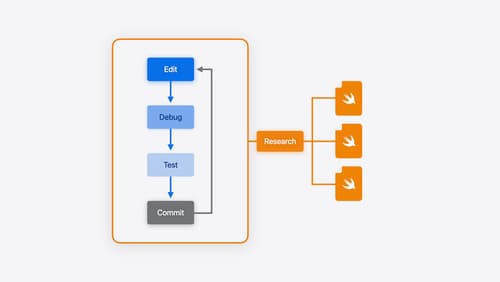
Xcode essentials
Edit, debug, commit, repeat. Explore the suite of tools in Xcode that help you iterate quickly when developing apps. Discover tips and tricks to help optimize and boost your development workflow.
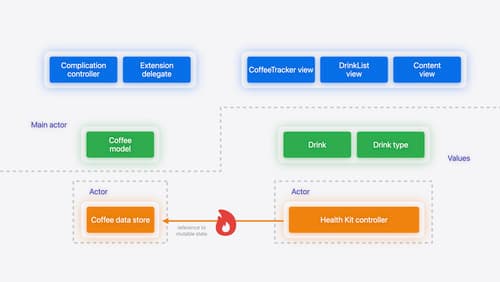
Migrate your app to Swift 6
Experience Swift 6 migration in action as we update an existing sample app. Learn how to migrate incrementally, module by module, and how the compiler helps you identify code that’s at risk of data races. Discover different techniques for ensuring clear isolation boundaries and eliminating concurrent access to shared mutable state.