keyboard navigation
Asked on 2026-05-14
1 search

Keyboard Navigation at WWDC
At WWDC, Apple has emphasized the importance of keyboard navigation, particularly in the context of accessibility and development tools like Xcode.
Accessibility and Keyboard Navigation
In the session titled "Make your Mac app more accessible to everyone," there is a focus on how keyboard shortcuts can enhance accessibility. For instance, Voiceover on Mac uses keyboard shortcuts to navigate by container, making it quicker to move across an app. This is particularly useful for users who rely on Voiceover to interact with their devices. SwiftUI can group accessibility elements into container accessibility elements, allowing Voiceover to focus in and out of these containers efficiently. This session also highlights the use of Accessibility Rotors, which allow users to quickly navigate between bookmarked pages using keyboard shortcuts.
Xcode and Keyboard Shortcuts
In the "Xcode essentials" session, various keyboard shortcuts are discussed to improve navigation and efficiency within Xcode. For example, the "Open Quickly" feature can be accessed with CMD + Shift + O, allowing developers to quickly jump to files or symbols by typing part of their name. Additionally, Xcode offers customizable key bindings and shortcuts for actions like jumping to definitions, editing all occurrences of a symbol, and navigating between files using the jump bar.
For more detailed insights into these topics, you can explore the following sessions:
- Make your Mac app more accessible to everyone (Navigation)
- Xcode essentials (Leverage shortcuts)
These sessions provide a comprehensive overview of how keyboard navigation is integrated into Apple's platforms to enhance both accessibility and developer productivity.

Make your Mac app more accessible to everyone
Learn how to integrate accessibility features that take full advantage of the power and flexibility of macOS. Go beyond the basics to learn how to support VoiceOver and Voice Control, improve the layout of your views, explore how assistive technologies navigate your content, and more.
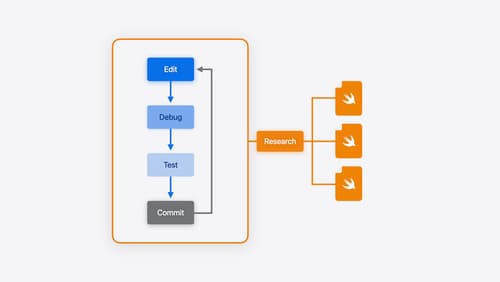
Xcode essentials
Edit, debug, commit, repeat. Explore the suite of tools in Xcode that help you iterate quickly when developing apps. Discover tips and tricks to help optimize and boost your development workflow.

What’s new in UIKit
Modernize your app with the latest APIs in UIKit, including enhanced menu bar support, automatic observation tracking, a new UI update method, and improvements to animations. We’ll also cover how you can include SwiftUI scenes in your UIKit app and explore SF Symbols, HDR color pickers, and more.