swiftUI 最新变化
Asked on 2026-06-22
•@wwdc261 search

SwiftUI 的最新变化,可以从 WWDC 里的这几场内容来概括:
主要更新
1. 交互更强
- 可拖拽重排(reorderable containers)
不只支持List,现在Grid、Stack等任意容器都能重排。 - 任意容器里的滑动操作(swipe actions)
以前主要在List里用,现在可以扩展到更多自定义容器。 - 更灵活的文本选择
iOS 上更接近TextField/TextEditor的完整选择体验;macOS 上还增加了自定义文本渲染、vibrancy、竖排文本等能力。
2. 工具栏和界面适配更好
- 新的工具栏适配能力,让 toolbar 在空间变化时更智能地重新布局。
- 可以用:
visibilityPriority:让重要按钮更晚被收起toolbarOverflowMenu:把次要操作放进溢出菜单topBarPinnedtrailing:把重要项固定在尾部
- 还有新的
toolbarMinimizeBehavior,可以在滚动时自动收起导航栏,提升可视空间。
3. 文档类应用能力增强
- SwiftUI 新增了更强的 Document API。
- 相比以前的
FileDocument/ReferenceFileDocument,新文档基础设施支持:- 直接访问文件 URL
- 只读写文件中需要的部分
- 观察和更新文档属性
- 与 Observation、Swift Concurrency 深度集成
4. 表现与性能提升
- 布局计算更高效,某些嵌套栈布局会更快。
State变成了更轻量的懒加载机制。asyncImage会自动使用 HTTP 缓存,减少重复下载。- SwiftUI / AppKit / UIKit 的底层架构也在进一步统一,带来整体性能提升。
5. 设计语言更新
- Apple 也提到新设计风格 Liquid Glass 带来的更新,让应用更有表现力,同时保持熟悉感。
如果你想看最相关的一场
最直接的是:
- What’s new in SwiftUI
- Platforms State of the Union
如果你愿意,我也可以继续帮你整理成:
- iOS 版 SwiftUI 新变化
- macOS 版 SwiftUI 新变化
- 按 API 分类的清单

What’s new in SwiftUI
Explore the latest additions to SwiftUI and discover how they can improve your apps. We’ll introduce a new Document protocol with direct disk access and snapshot-based diffing for building high-performance apps; new APIs for reordering content in lists, grids, and sections; and toolbar enhancements including visibility priority and auto-minimizing behavior. We’ll also cover expanded presentation APIs — including swipe actions on any view — plus AsyncImage caching improvements and lazy state initialization for Observable types.
Platforms State of the Union
Discover the newest advancements on Apple platforms.
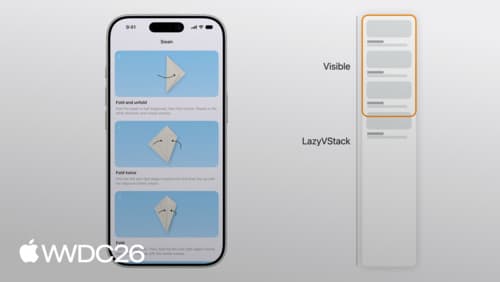
Dive into lazy stacks and scrolling with SwiftUI
Discover the inner workings of lazy stacks in SwiftUI. We’ll explore how LazyVStack and LazyHStack estimate sizes, lazily load subviews, and prefetch content to deliver smooth scrolling experiences. We’ll also cover advanced performance optimizations, state management best practices, and tips for precise programmatic scrolling. To get the most out of this session, we recommend basic familiarity with SwiftUI layout using stacks.