table
Asked on 2026-03-03
1 search

It seems like you're interested in the topic of tables as discussed in various sessions at WWDC. Here are some relevant insights from the sessions:
-
Meet TabletopKit for visionOS: This session discusses how to set up a table for tabletop games in visionOS. The table can be circular or rectangular, and it serves as the foundation for gameplay. The session also covers how to position seats around the table and how players interact with the game elements on the table. You can learn more about setting up the play surface in the session Meet TabletopKit for visionOS (02:37).
-
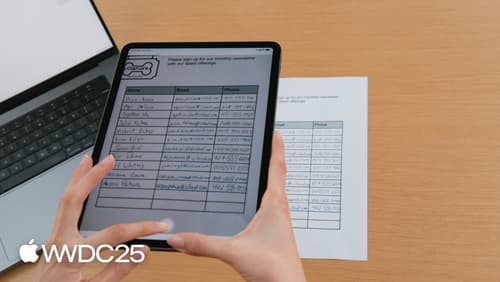
Read documents using the Vision framework: This session explains how to use the Vision framework to detect and extract tables from documents. It involves taking a photo of a document, using a Recognized Documents request to detect tables, and accessing the table's structure and content. The session provides a detailed look at how to work with tables in document images. For more on reading documents, see Read documents using the Vision framework (01:22).
-
Code-along: Explore localization with Xcode: In this session, the concept of a "table" is used in the context of string localization. Strings are grouped into tables for easier management and localization. This session provides insights into how to manage and refactor string tables in Xcode. For managing complexity in localization, refer to Code-along: Explore localization with Xcode (09:33).
These sessions provide a comprehensive look at how tables are utilized in different contexts, from game development to document processing and localization.

Meet TabletopKit for visionOS
Build a board game for visionOS from scratch using TabletopKit. We’ll show you how to set up your game, add powerful rendering using RealityKit, and enable multiplayer using spatial Personas in FaceTime with only a few extra lines of code.
Read documents using the Vision framework
Learn about the latest advancements in the Vision framework. We’ll introduce RecognizeDocumentsRequest, and how you can use it to read lines of text and group them into paragraphs, read tables, etc. And we’ll also dive into camera lens smudge detection, and how to identify potentially smudged images in photo libraries or your own camera capture pipeline.
Code-along: Explore localization with Xcode
Learn how to localize your app into additional languages using Xcode. We’ll walk step-by-step through the process of creating a String Catalog, translating text, and exchanging files with external translators. You’ll learn best practices for providing necessary context to translators and how Xcode can help to provide this information automatically. For larger projects, we’ll also dive into techniques to manage complexity and streamline string management using type-safe Swift code.