what's new for uikit in iOS 27
Asked on 2026-09-13
1 search

If you mean iOS 27, I don’t know of any WWDC session in the provided context that covers UIKit changes for iOS 27 specifically.
The most relevant UIKit update session in the context is What’s new in UIKit from WWDC 2025, which covers iOS 26. It highlights:
- Liquid Glass and the new design system
- Improved containers and adaptivity in
UISplitViewController - New menu bar APIs on iPad
- Built-in Swift observation support in UIKit
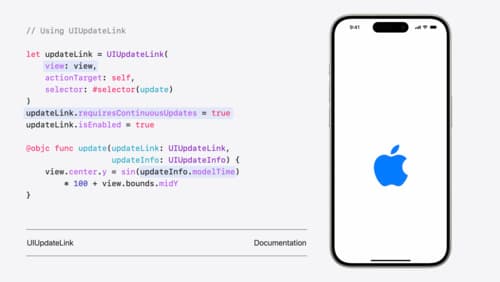
- New UI update methods
- HDR color support
- Typed notification APIs
- Scene-based lifecycle migration
- OpenURL support for file URLs
- SF Symbols 7 updates
If you want, I can summarize the UIKit changes for iOS 26 from that session in more detail.

What’s new in UIKit
Modernize your app with the latest APIs in UIKit, including enhanced menu bar support, automatic observation tracking, a new UI update method, and improvements to animations. We’ll also cover how you can include SwiftUI scenes in your UIKit app and explore SF Symbols, HDR color pickers, and more.
Build a UIKit app with the new design
Update your UIKit app to take full advantage of the new design system. We’ll dive into key changes to tab views, split views, bars, presentations, search, and controls, and show you how to use Liquid Glass in your custom UI. To get the most out of this video, we recommend first watching “Get to know the new design system” for general design guidance.
What’s new in UIKit
Explore everything new in UIKit, including tab and document launch experiences, transitions, and text and input changes. We’ll also discuss better-than-ever interoperability between UIKit and SwiftUI animations and gestures, as well as general improvements throughout UIKit.