What's new in WebKit and Safari 27?
Asked on 2026-06-16
2 searches

Safari 27 brings more than 60 new WebKit features in the first beta, along with a strong focus on quality, compatibility, standards alignment, and integration.
Highlights mentioned in the session
- Quality improvements: over 1,100 fixes and feature improvements since last fall
- Compatibility work: fixes for real-world site issues, including better handling of emoji input
- Standards alignment: many updates to match evolving web standards
- Integration fixes: improving how features work together, such as responsive image and CSS function support
New features called out
- CSS Grid Lanes — useful for masonry-style layouts in pure CSS
- Customizable Select — customize native select UI
- HTML
modelelement — support for web-based 3D model content - Immersive Website Environments
- Web Extensions updates
- MapKit JS mentions as part of the broader web platform support
Other examples of WebKit work
The session also mentions:
- SVG improvements
- the CSS
random()function updates - anchor positioning and view transitions updates from recent Safari work
- broader improvements to browser behavior and interoperability
If you want, I can also summarize the session by chapter, like quality improvements, Grid Lanes, Customizable Select, or Model element.

What’s new in WebKit for Safari 27
Explore what’s new in WebKit — from Grid Lanes and Customizable Select, to HTML Model and Immersive Environments, and the latest for Web Extensions. You’ll also discover the work behind over 1,000 browser engine improvements that make the web more reliable.
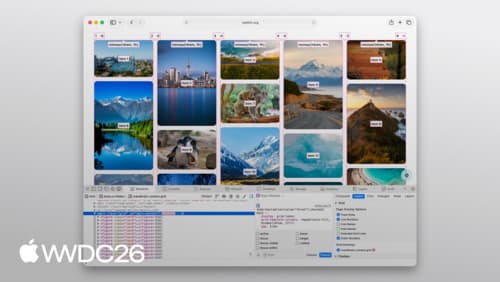
Learn CSS Grid Lanes
Build adaptive web layouts that embrace content of all shapes and sizes. Explore how Grid Lanes lets you arrange differently-shaped elements into clean, flexible designs with simple CSS. And find out how flow-tolerance helps you refine accessibility while keeping your layouts malleable.

What’s new in Safari and WebKit
Learn how the latest web technologies in Safari and WebKit can help you create incredible experiences. We’ll highlight different CSS features and how they work, including scroll driven animation, cross document view transitions, and anchor positioning. We’ll also explore new media support across audio, video, images, and icons.