wwdc 26 上 swiftui 有什么新功能
Asked on 2026-06-15
1 search

WWDC 2026 里,SwiftUI 的新功能主要集中在这几类:
1. 更丰富的交互
- 可重排容器(reorderable containers):可以很方便地给任何容器加拖拽排序,不再局限于
List。 - 支持任意容器中的滑动操作(swipe actions):比如在自定义网格、栈等容器里也能直接做删除、更多操作等手势。
2. 更强的 AppKit / UIKit 集成
- SwiftUI 继续深入到更多系统控件和场景中。
- 你可以:
- 在 AppKit 里逐步采用 SwiftUI
- 把 SwiftUI 放进现有的 AppKit 层级中
- 在 SwiftUI 视图中直接使用手势识别器
- 用 SwiftUI 创建菜单项并加入主菜单
- 用 SwiftUI 构建 scenes
3. 更强的图形与效果能力
- SwiftUI 继续扩展到更高级的图形效果方向。
- WWDC 2026 还专门有一场关于 advanced graphics effects 的 SwiftUI 主题,说明它在复杂视觉效果、动画管线、合成方面能力更强了。
4. 性能和速度
- 这次强调了 SwiftUI 让 app 更快,尤其是在大型列表、滚动等方面持续优化。
如果你想,我也可以继续按 “交互 / 性能 / 图形 / 与 AppKit&UIKit 集成” 这几个主题,把 WWDC 2026 的 SwiftUI 更新整理成一张更清晰的表。
Platforms State of the Union
Discover the newest advancements on Apple platforms.
Use SwiftUI with AppKit and UIKit
Discover how to incrementally adopt SwiftUI in your existing AppKit or UIKit app. We’ll show you how to use the Observation framework to automatically update your views, integrate SwiftUI components into an existing view hierarchy, and bring gesture recognizers into SwiftUI. We’ll also explore how to add complete SwiftUI scenes to your app without changing your overall architecture.
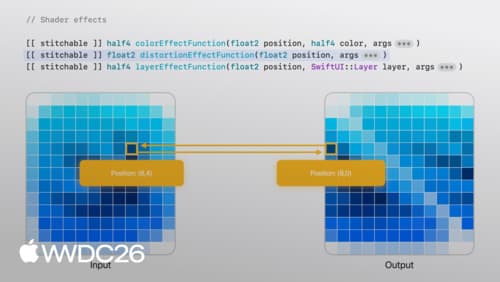
Compose advanced graphics effects with SwiftUI
Discover how to craft rich, custom experiences by creatively composing SwiftUI layout and graphics APIs. We’ll show you how to break down complex designs and use a creative pipeline to chain simple building blocks together. Learn how to draw with layer shaders, animate with timelines, and anchor views with alignment guides.